For contractors and service businesses
An AI receptionist for contractors, connected to the next step.
You cannot always stop work to answer an inquiry. Service Zen’s AI receptionist can collect service details and help turn conversations into structured work requests for your team to review and follow up.
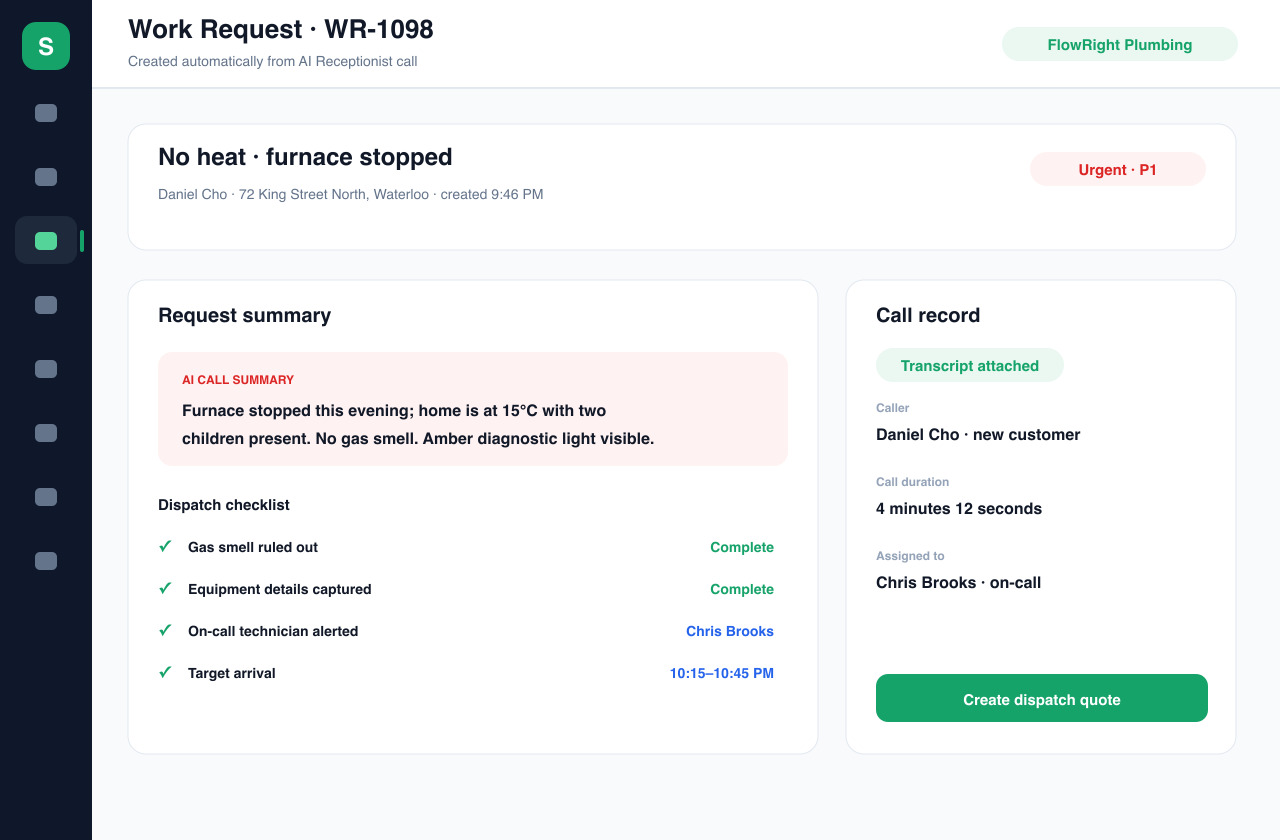
Give incoming inquiries a place to go and your team useful context.
The everyday workflow
From an incoming conversation to a useful work request
Set the business context
Configure the business name, services, service area and information the receptionist should use. Decide what it should collect and when your team should take over. Voice, phone and messaging availability depend on the channels and integrations configured for your account.
Ask for the details that matter
For a repair inquiry, useful intake includes the caller’s contact details, service location, description of the issue and preferred timing. Keep the questions focused on what your office needs to assess the request. A clear intake should help a person make the next decision.
Review the captured request
Supported receptionist workflows can save the conversation and create a structured work request. Review the summary and available transcript for missing or misunderstood details before using them. Check scope, location and urgency rather than assuming that every inquiry is ready to book.
Choose the next business action
Use the request to prepare a quote, arrange follow-up or plan a job as appropriate. Your team remains responsible for confirming availability, approving pricing and deciding which work to accept. Keeping intake connected to those workflows helps avoid a separate pile of messages.
Built around your work
Make the receptionist fit how your business operates
Build a useful handoff
A contractor needs more than a name and callback number. A plumber may need to distinguish a dripping tap from an active leak; an electrician may need the property address and a description of the requested installation. Set intake expectations around your services and review example conversations with the people who handle follow-up.
Keep promises within your actual capacity
Set clear expectations about service hours, coverage and response times. Test what happens when someone asks for an exact price, a same-day visit or a service you do not offer. Treat captured timing as a request until your business has confirmed the appointment through its normal process.
Connect reception to the back office
Service Zen also includes CRM, quoting, job scheduling and invoicing. That gives your team somewhere to take the inquiry after the conversation ends. Receptionist setup, channel availability and usage vary with configuration; review the current plan and test the intended channel before making it part of live customer intake.
A few useful answers
Before you get started.
What does an AI receptionist do for a contractor?
It can respond to inquiries using configured business information, ask intake questions and capture service details. In Service Zen, supported workflows connect that information to work requests that your team can review and take forward.
Does it work on my existing phone number?
Phone-number routing and voice availability depend on your channel and integration setup. Confirm support for your intended number and call flow during setup, and test incoming calls before directing customers to it.
Does the AI confirm every appointment automatically?
Do not assume that an intake conversation is a confirmed appointment. Booking behavior depends on the configured workflow and availability. Your team should verify the request, service scope and schedule before promising attendance.
Can my team review what the customer said?
Supported receptionist workflows save conversation details and transcripts with the request. Review what is captured in your chosen channel during setup so the team knows where to find context and when to clarify details with the customer.
See how it fits your business.
Explore the demo, then compare the current plans.