“Completed jobs sit unbilled until Friday night because no one had time to sit at a desktop computer.”
✓ With Service Zen
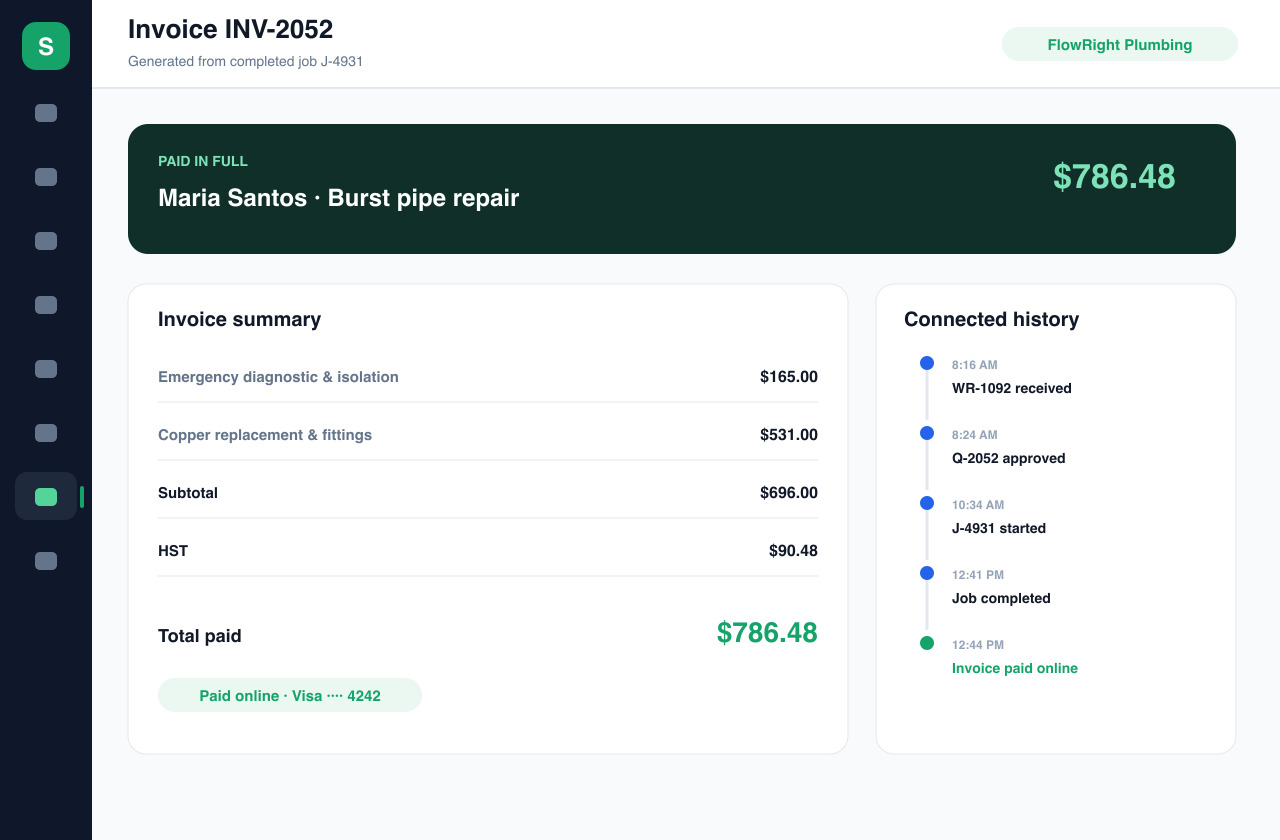
Generate the invoice directly from the job or approved quote as soon as the work is marked complete.
Finishing the job should be the hard part—getting paid shouldn’t take another two weeks. Service Zen turns completed jobs and approved quotes into clear invoices with online card payments and automated follow-up.
Send the bill before you leave the driveway and track every dollar in one place. Built for four-season trade & service teams
“Completed jobs sit unbilled until Friday night because no one had time to sit at a desktop computer.”
Generate the invoice directly from the job or approved quote as soon as the work is marked complete.
“Waiting on paper checks or manual bank transfers ties up cash flow needed for materials and payroll.”
Connect Stripe so clients can pay their invoice online from their phone or computer with a click.
“Chasing overdue balances feels awkward and takes time away from booking new work.”
See paid, pending and overdue invoices at a glance and use structured payment reminders tied to the exact bill.
When job notes, approved quote items, 13% tax settings and invoice status live in one place, your office spends less time retyping bills.
Configure Stripe Connect to accept online invoice payments and keep every balance linked to the original job.
Contractors sending digital invoices with online Stripe Connect card links collect in under 2 days on average compared to nearly 3 weeks for paper/check billing.
Generating invoices directly from completed jobs eliminates Friday-night retyping and lost material receipts.
Invoices that include completion notes, separate labour/material lines and published warranty terms rarely get held up by billing questions.
Most overdue residential invoices are simply forgotten—a polite automated reminder with a direct payment link resolves over 80% of them.
Pair clear job-linked invoices with a calm, professional reminder sequence.
Tax & Accounting Note: Keep GST/HST/PST rates consistent across quotes and invoices so your monthly or quarterly remittance reports reconcile cleanly.
Pull the client details, service address and agreed line items straight from the completed job or approved estimate.
Add any additional materials used on site, verify tax calculations and attach your published payment or warranty policies.
Deliver a crisp, itemized invoice that lets the customer review the work performed and pay online via Stripe Connect.
Monitor invoice status, recorded payments and Stripe Connect payouts from your payments dashboard without spreadsheet reconciliation.
When an invoice clearly lists the callout fee, labour hours, replacement parts and completion notes from the job, customers pay with confidence.
Complete your Stripe Connect onboarding inside Service Zen to accept online payments directly from clients and view balances, payouts and refunds.
Keep your revenue reports, tax totals and payment history organized, with QuickBooks integration available to keep your books aligned.
Service Zen integrates with Stripe Connect so service providers can accept online card payments on invoices and payment links. Payouts go to your connected bank account according to your Stripe schedule.
Yes. You can record offline or external payments against an invoice so your customer balance and revenue reports stay accurate.
Yes. Service Zen includes payment reminder workflows so you can follow up on outstanding invoices with clear links back to the bill.
Explore the live demo, test a workflow, or compare our current plans.