“Technicians call the office between stops asking for the gate code, job scope or customer phone number.”
✓ With Service Zen
Attach client history, property notes, checklists and approved quote items directly to the scheduled job.
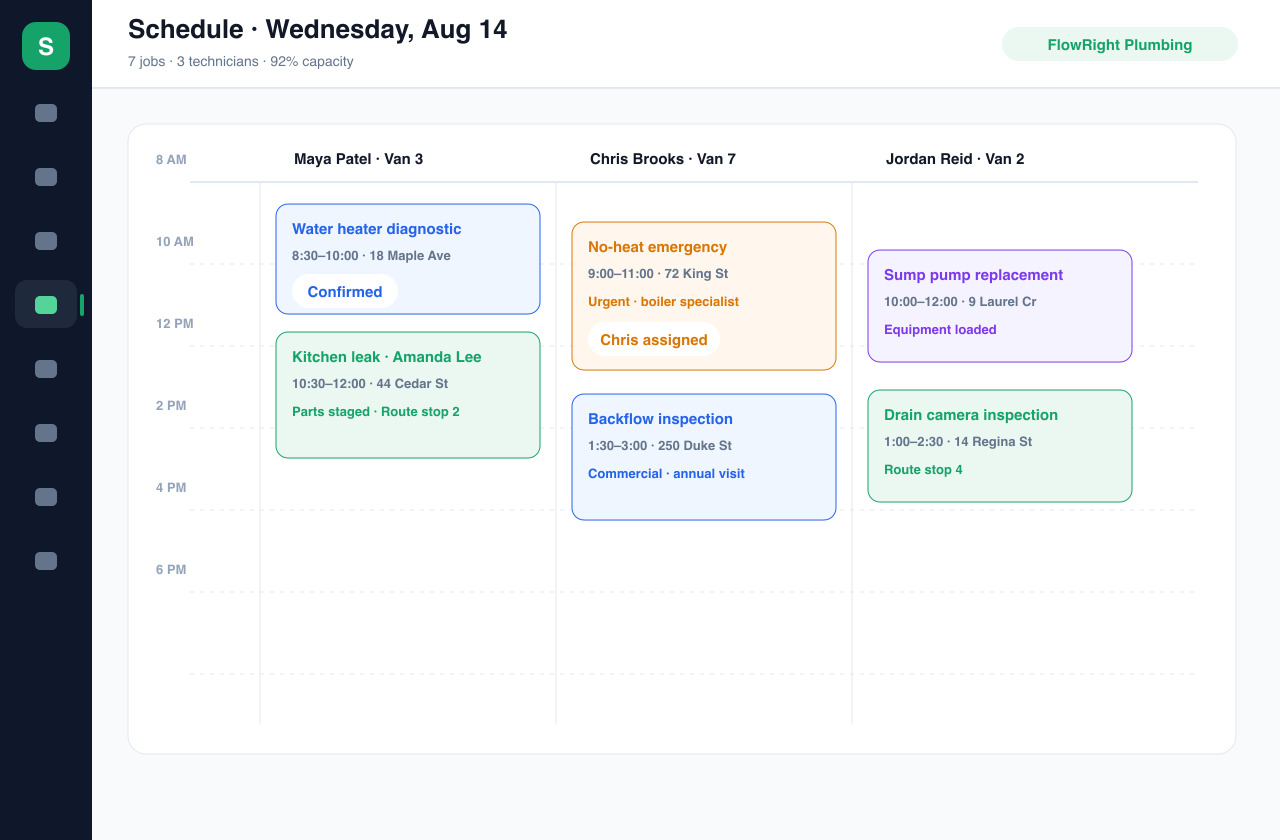
When your calendar lives across text threads, whiteboards and memory, one delayed job throws off the whole crew. Service Zen puts every appointment, technician assignment, job note and route in one shared schedule.
See who is available, where they are headed and what each visit requires. Built for four-season trade & service teams
“Technicians call the office between stops asking for the gate code, job scope or customer phone number.”
Attach client history, property notes, checklists and approved quote items directly to the scheduled job.
“Rescheduling a rained-out visit or a long repair means texting three people and rewriting a whiteboard.”
Move the appointment on a shared calendar so the assigned technician and the office see the updated plan immediately.
“Crews spend hours in traffic driving past each other because stops were booked without checking geography.”
Pair calendar scheduling with route planning so stop order accounts for both travel time and appointment windows.
Grouping nearby stops and keeping gate codes, equipment models and checklists on the calendar cuts backtracking across scheduling & dispatch routes.
Review technician assignments and route order side by side in the Service Zen schedule.
Sequencing stops by geographic corridor instead of booking order saves roughly 3–4.5 hours per truck every week.
Pairing realistic job duration buffers with a 2-hour arrival window and an “On My Way” text keeps on-time arrival rates above 92%.
When techs have gate codes, photos and scope notes on their calendar card, mid-day check-in calls to the office drop by more than half.
Reclaimed drive and rescheduling time typically opens enough room for 2–3 additional billable service calls per van each week.
Structure your daily calendar with zone grouping and a built-in diagnostic flex buffer so one long repair never wrecks the afternoon.
Dispatcher Tip: Never book 100% of clock hours back-to-back. A single 60–90 minute flex block per day protects customer trust and prevents overtime burn.
Start from a work request or an approved quote so the client address, contact details and agreed scope carry over automatically without retyping.
Check your daily or weekly team calendar to spot open windows, compare technician workload and assign the visit with realistic duration buffers.
Review the day’s stops on the map to cut unnecessary backtracking while respecting promised arrival windows and priority calls.
As field techs complete checklists, log time and mark jobs done, the office sees real-time progress and can generate the invoice right away.
Whether you run emergency repair callouts, multi-day installations or weekly maintenance routes, Service Zen keeps recurring series and single visits on the same conflict-checked board.
A calendar block without context is just an address. Service Zen links each scheduled visit to the customer profile, past jobs, custom fields and job forms so technicians arrive prepared.
Field schedules rarely stay frozen after 9 AM. When an urgent request arrives or a part is delayed, dispatchers can reassign visits and keep client notifications aligned with the new time.
Yes. Team members sign in with role-based access to view their assigned jobs, customer addresses, scope notes and checklists from the field.
Yes. You can configure recurring schedules for routine maintenance, seasonal tune-ups, lawn care or repeat cleaning visits and track each occurrence.
Service Zen includes routing tools that let you inspect the geographic sequence of stops alongside your scheduled appointment times so you can reduce wasted drive time.
Explore the live demo, test a workflow, or compare our current plans.